The banner text is short:
COUNT MY TEXT!
Word and character count and optimizing software.
The COUNT MY TEXT! program can count all the words in the banner, starting with the word "Count". It reports 10 words, the character counter reports 54 visible characters (the letters and punctuation), 70 characters plus spaces, and 71 characters plus spaces and line feeds (there is a line feed after the word "Text!").
When COUNT MY TEXT! optimizes this text, the word counter results are the same -- 10 words, the character counter results are the same -- 54 visible characters (the letters and punctuation), but the extra spaces have been automatically removed, resulting in a dramatic decrease to 62 characters plus spaces, and only 63 characters plus spaces and line feeds.
If you missed this watching the animation, just keep watching as it recycles and shows you the change and results.
Did you notice that there were 8 extra spaces in the original headline text?
It is easy to miss extra spaces in text, our eyes tend to ignore them, and some word processors ignore them. This is why COUNT MY TEXT! is so important for you. It finds what your eyes might miss. A word processor might not find extra spaces and report them.
More, if there was a trailing Line Feed (sometimes inserted by a word processor), Count My Text! would have removed it because trailing line feeds are usually unnecessary and eat up character count space.
Most input text submission boxes on the Internet submission sites include spaces in their character counter, and this makes an important difference. An input text box with a character count limit of 70 characters would reject or truncate the first occurrence of the title banner, but it would have no problem with the optimized banner.
This is why COUNT MY TEXT! is the ideal word counter and character counter and optimizing program for anyone using submission sites that have input submission text boxes with character limits! And it can handle full documents (up to 10,000 characters), so it is ideal for document management.
 Click here to Buy Now - $29.95
A DEMO of this program is available from our Awards Page. Just go there and click on any award icon to download the demo from a software listing site.
Click here to read our Purchasing and Support Policy. This will open in a separate tab or window.
WHY COUNT MY TEXT!?
Normally, we don't write our product web sites in the first person because we don't think it looks professional. But COUNT MY TEXT! is so unique and reaches such a specific audience that we feel a story of WHY it was developed best explains it.
Our story...
ClydeSight Productions is like any on-line business. We have to create good SEO work; we post press releases, post to forums, write blogs, and post to classified advertising sites.
We kept running into a common problem with these venues.
They all have specific character and word count requirements about the amount of text in a submission. If the text exceeds the limits, some cut off the text, some report an error and re-set everything, some charge for extra characters. Each venue is slightly different. Some provide an on line character counter (which is useful only if you are typing directly into the submission box), some allow copy-and-paste from another source (such as a word processor); some give no indication of their rules. It can be very confusing!
The Problem…
We had been using our word processor to get character counts, but found it rarely agreed with what some of these venues were counting. This made our word processor very undependable for this use. We figured there had to be a better way!
We researched how these sites were counting words and characters. We discovered that many of them were using different "rules" than our word processor, and that sometimes our word processor wasn't supported for copy-and-paste because it used hidden codes, causing a discrepancy.
We found out how the different venues performed their counts, what they were including in the count total, and what was making them reject copy-and-paste from our word processor.
The Solution…
We created COUNT MY TEXT! to solve these problems. It counts text the way the submission sites on the Internet do, and its Optimize feature resolves hidden codes and strips unnecessary spaces for tighter text while leaving line feeds alone for formatting.
With COUNT MY TEXT!, we could easily create text submissions that met the rules of the different venues and make best use of the space they provided -- free of errors.
It has worked for us every time.
The Global Solution…
We had developed COUNT MY TEXT! for our own use. However, we shared the early versions of the program with some friends and colleagues who were experiencing similar text submission problems. The program helped them out and they were very enthusiastic about the results they got. They suggested we make it commercially available because it was so helpful.
"What can I say -- but -- WOW -- and DOUBLE WOW!
A webmaster's dream come true!! This will help SOOOOO many people -- and you have included an incredible amount of functions!! It is a great tool for EVERYONE!"
--Elizabeth (www.addyourad.net)
That's how COUNT MY TEXT! came to be part of the ClydeSight Productions product line. It has helped us, it can help you.
Click here to Buy Now - $29.95
A DEMO of this program is available from our Awards Page. Just go there and click on any award icon to download the demo from a software listing site.
Click here to read our Purchasing and Support Policy. This will open in a separate tab or window.
COUNT MY TEXT! at Work - Four Success Stories.
Below are four stories of how COUNT MY TEXT! helped us and colleagues succeed with their Internet submission process.
The Resume * The Forum * The SEO * The Classified Ad
The Mysterious Resume Rejection:
Keff Dolan, Voice Artist. (www.keffdolan.com) was posting his resume to a Web site so he could get more exposure. He called us for help because the site continuously rejected his submission, but would not tell him why. He'd spent two hours struggling with the site and was getting very frustrated.
He sent us his text and we could not see anything "wrong" in our word processor (we used the same one he used). We checked the resume site but there was no clue why it was rejecting the submission.
At the time we had just finished developing COUNT MY TEXT!, and sent it to Keff to try with his resume. He copied-and-pasted his resume text into COUNT MY TEXT! and set it to optimize. It stripped out the extra spaces and hidden codes in his resume. It preserved his line feeds for formatting, and "cleaned" up his leading indents by removing the leading spaces he had used.
Keff then copied-and-pasted his resume into the submission site. It accepted his submission with no problems and displayed his resume exactly as he wanted it.
Keff was very pleased and sent us a comment to post on our Web site:
"VERY interesting Program--
I pasted a number of documents including resume & Optimized !!! What a difference this can make for students to Professionals. Really like the line feed feature- You really can put an otherwise lengthy document in & BAM! Optimize & the document is transformed into a concise, properly spaced item."
--Keff (www.keffdolan.com)
Click here to Buy Now - $29.95
A DEMO of this program is available from our Awards Page. Just go there and click on any award icon to download the demo from a software listing site.
Click here to read our Purchasing and Support Policy. This will open in a separate tab or window.
The Forum Profile Truncation:
A forum to which we were posting our profile had very specific character limits for its submission box. The forum did specify the character count limit, so we knew what was required.
We used our word processor to create and spell check our submission off-line, checked the character count and then copied-and-pasted the text into the forum submission box.
It truncated our text, leaving out the last few words.
We check our text for character count using our word processor. It actually reported fewer characters used than the forum site required. This was very mysterious to us.
We took the same text and pasted it into COUNT MY TEXT! and optimized it. It was THEN that we saw the problem our word processor had not indicated.
COUNT MY TEXT! includes line feeds in the count report and optimization process. Our word processor ignores line feeds in the character count. So when we saw the character count revealed by COUNT MY TEXT!, we could see -- because it included line feeds -- that we had gone "over" the limit allowed by the forum site. Obviously, the forum site was counting line feeds as characters.
Now that we knew what was happening, it was a simple matter to edit our text in COUNT MY TEXT! and get the character count down to the forum limit. When we copied-and-pasted the new text into the forum site, it was accepted and complete, no problems at all. And COUNT MY TEXT! preserved our line feeds for paragraph formatting! The same process can be used in blog sites where character counts are used to limit the text for different sections (such as "Squidoo").
Click here to Buy Now - $29.95
A DEMO of this program is available from our Awards Page. Just go there and click on any award icon to download the demo from a software listing site.
Click here to read our Purchasing and Support Policy. This will open in a separate tab or window.
The SEO (Search Engine Optimization) Fix:
One of our friends was using a title tag (sometimes called a meta tag) to optimize his Web site for the search engines. His title tag (the name of his Web page) was only partially listed in Google, and followed by mysterious ellipses (those three little dots …) at then end. It appeared to have been "clipped". This can often be seen in searches, as many page titles are too long and tend to get clipped. His site was also ranked quite far down on the list.
He had followed advice from an SEO (search engine optimization) forum that told him the proper number of characters he could use for a title tag (sometimes referred to as a meta tag). His word processor told him his title tag was within the character count limits. He could not figure it out. He looked everywhere for information about the use of a meta tag on the Internet, and only got more confused. He called us for help.
It was immediately obvious that his title tag exceeded the search engine's character limits. Search engines do impose character count limits on a meta tag, particularly the title tag and the description tag. But it is hard to find out what those limits are. If you go over the limit, they "clip" the listing and insert the ellipses to indicate there is more information.
That is why our friend's title tag was "clipped" and had the ellipses. We checked the forum where he got the SEO (search engine optimization) advice which seemed very authoritative, even authored by a search engine optimization professional, and then thought "A-ha! Let's use COUNT MY TEXT! in reverse -- count what is there to find out what is allowed!"
We did the same search our friend had done and copied-and-pasted a few of the long "clipped" title tags we found on the search engine results into COUNT MY TEXT! We then removed the ellipses in COUNT MY TEXT! and did a re-count. This told us the "safe" character limit the search engine was imposing on a title tag.
Our friend revised his title tag to meet the character count revealed by COUNT MY TEXT! and reposted his page. Two weeks later, the search engine re-indexed the page, with the new title tag, and his ranking actually improved!
Click here to Buy Now - $29.95
A DEMO of this program is available from our Awards Page. Just go there and click on any award icon to download the demo from a software listing site.
Click here to read our Purchasing and Support Policy. This will open in a separate tab or window.
The Truncated Classified Advertising Headline:
We advertise on some free classified advertising Web sites. Classifieds are a good way to tell people about our products. Some give us specifications, but one of them doesn't say how many characters an ad headline or body can have.
Because of this, our headlines were being cut off or truncated, ruining our classifieds. We were guessing at what would be allowed. It was a game of cat-and-mouse. Then we thought about it and the solution was simple -- COUNT MY TEXT!!
We pasted a headline into the ad submission form on the classified advertising site and allowed it to truncate. We then copied the truncated headline from the input box, pasted it into COUNT MY TEXT!, and did a character count. We discovered that the classified advertising site was limiting the ad headline to 50 characters, including spaces. It was doing something similar with the body copy, but COUNT MY TEXT! gave us the answer.
It was then very easy to write a 50 character headline in COUNT MY TEXT! and paste it into the classified advertising site, and fix our body copy to fit the requirements. Of course, the site accepted it and posted it as we wanted. Now all our classifieds on that site work just fine.
Click here to Buy Now - $29.95
A DEMO of this program is available from our Awards Page. Just go there and click on any award icon to download the demo from a software listing site.
Click here to read our Purchasing and Support Policy. This will open in a separate tab or window.
The Bottom Line:
COUNT MY TEXT! helps solve confusing issues with all types of sites where one has to put text into an "input text box". Our word processor simply did not check things thoroughly enough to do it – our friends encountered the same problem. This is why we created COUNT MY TEXT!, so we would have a reliable and accurate character counting tool that worked the way the "real world" submission sites do.
We use our program all the time, and it has made our work much easier! It's a small program, runs very fast (it's FLASH based) and it has come to our rescue many times when the information we need about character counts is not provided, or does not work in accordance with what our word processor tells us. In fact, we no longer use our word processor to count characters; COUNT MY TEXT! is easier and does a better job for us.
It can do this for you too!
Take a look at the different venue topic areas listed at the top of this page (where it says: "It is ideal for…") and get a more detailed explanation of how COUNT MY TEXT! can work for you when you are working with these venues.
COUNT MY TEXT! works on Windows and MAC computers.
We created it for ourselves.
Now you can get it too!
Click here to Buy Now - $29.95
A DEMO of this program is available from our Awards Page. Just go there and click on any award icon to download the demo from a software listing site.
Click here to read our Purchasing and Support Policy. This will open in a separate tab or window.
Count My Text is a unique text counter and word counter that gives an accurate text count or character count better than a word processor This software utility is ideal for document management when posting to classifieds, ppc ads, forums, profiles or for writing press releases (pr). It's excellent for the Webmaster who needs computer software that helps manage HTML text and META tags where character count is important. It supplements writing software, and is compatible with most computers, it's available as mac software and windows software.
 Visit clydesight.com Master Site
Web site copyright ©ClydeSight Productions - 2006


 Winner of 22 Software Awards!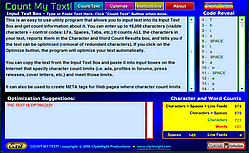
 Watch This!